
If you’ve ever stumbled upon a website that felt less like a document and more like a living, breathing experience, you’ve likely encountered the magic of GSAP (GreenSock Animation Platform). For beginners, looking at a blank VS Code editor can be intimidating. You know you want things to move, but how do you move them with grace, performance, and style?
The secret to becoming a great animator isn’t just reading documentation, it’s observation. In the world of front-end development, CodePen is the ultimate playground, and a few specific creators have turned that playground into a masterclass.
Why You Should Use GSAP on the Modern Web
In a digital landscape where users decide whether to stay on a site in mere seconds, static layouts are no longer enough. Modern web development in 2026 isn’t just about delivering information; it’s about crafting an experience. This is where the GreenSock Animation Platform (GSAP) becomes your secret weapon.
1. Performance Without Compromise
While CSS animations are great for simple hovers, they quickly become “janky” (laggy) when handling complex sequences. GSAP is engineered for lightning-fast performance. It uses highly optimized JavaScript property manipulation and requestAnimationFrame to ensure 60FPS (frames per second) smoothness, even on lower-end mobile devices. By offloading transforms to the GPU, GSAP ensures your animations feel buttery-smooth rather than a burden on the browser’s main thread.
2. Total Control & Orchestration
The biggest pain point of CSS keyframes is timing. If you want to change the delay of one middle step, you often have to recalculate the percentages for the entire sequence. GSAP Timelines solve this entirely. They allow you to chain, overlap, and nest animations with surgical precision. You can pause, reverse, or seek to a specific millisecond of an animation; something that is nearly impossible with standard CSS.
See the Pen GSAP: Project 1 by Niresh Shrestha (@dewebkiller) on CodePen.
3. The “ScrollTrigger” Revolution
Scroll-based storytelling is the gold standard for modern landing pages. GSAP’s ScrollTrigger plugin has become the industry benchmark, allowing you to trigger animations based on scroll position, pin sections in place, or create complex parallax effects with minimal code. It handles all the heavy lifting of intersection observers and scroll listeners under the hood.
See the Pen Fullscreen image reveal using gsap by Niresh Shrestha (@dewebkiller) on CodePen.
4. Now 100% Free & Accessible
As of 2025, GSAP made a historic move by making its entire suite, including premium plugins like SplitText and MorphSVG, completely free for everyone. With its recent native integration into platforms like Webflow and dedicated hooks for React (useGSAP), there has never been a lower barrier to entry for such a high-powered professional tool.
This comprehensive tutorial shows how to use GSAP in real-world projects to create the kind of high-end portfolios that get developers hired in 2026.
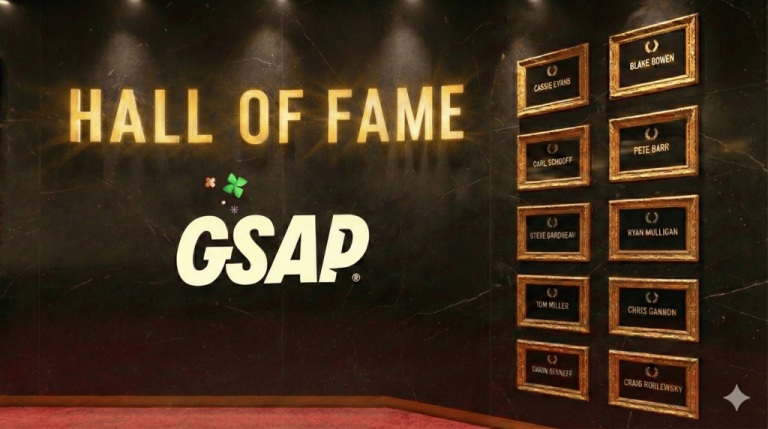
Whether you are just learning gsap.to() or you’re trying to understand complex timelines, these 10 masters are the “North Stars” of web animation.
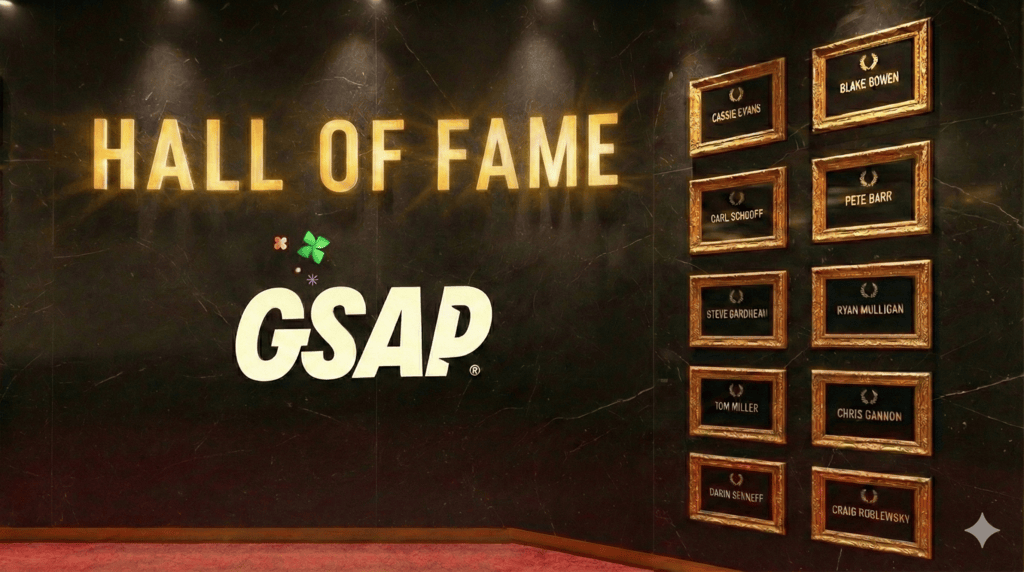
Here is the GSAP Hall of Fame.
1. Cassie Evans: The Queen of SVG Playfulness
If you want to see how code can have a sense of humor, look no further than Cassie Evans. Cassie has a unique ability to take complex SVG (Scalable Vector Graphics) and turn them into interactive stories.
Why she’s a Master: For beginners, Cassie’s work is the perfect entry point because it focuses on character. She doesn’t just move a box from left to right; she makes a character blink, wiggle, or react to a mouse movement. Her code is remarkably clean, and she often shares the “why” behind her animations.
What to learn from her:
- SVG Morphing: How to change one shape into another seamlessly.
- Staggers: Using GSAP to trigger multiple elements with slight delays to create a “wave” effect.
- Creative Thinking: How to use animation to give a brand a “personality.”
2. Blake Bowen: The Logic Architect
Blake Bowen is often the person other experts go to when they are stuck. If Cassie is the heart of GSAP, Blake is the brain. His pens often involve deep JavaScript logic, custom physics, and massive amounts of data points moving in perfect harmony.
Why he’s a Master: Blake pushes the technical boundaries of the browser. He explores how GSAP can interact with Canvas, how to handle collision detection, and how to create complex “drag-and-drop” interfaces that feel buttery smooth.
What to learn from him:
- Performance: How to animate thousands of objects without the browser lagging.
- Physics-based Animation: Creating movement that feels like it has weight and momentum.
- Advanced GSAP Plugins: Blake is a wizard with the more technical plugins like Draggable and Inertia.
3. Carl Schooff: The Ultimate Educator
Carl Schooff (the man behind Creative Coding Club) is perhaps the most important person on this list for a beginner. While others show you what can be done, Carl shows you how it’s done.
Why he’s a Master: Carl’s pens are designed to be read. They are often accompanied by comments and logical structures that make the GSAP Timeline seem simple. He breaks down the “voodoo” of animation into repeatable steps.
What to learn from him:
- Timeline Control: Learning how to nest timelines within other timelines.
- Modular Code: How to write animation code that is easy to update and maintain.
- The Fundamentals: He reinforces the core pillars of GSAP: ease, duration, and delay.
4. Pete Barr: The High-End UI Specialist
If you aspire to build award-winning agency websites (the kind you see on Awwwards or FWA), Pete Barr is your primary source of inspiration. His work focuses on “Micro-interactions” and seamless transitions.
Why he’s a Master: Pete understands that in professional web design, less is often more. His animations aren’t loud; they are sophisticated. He shows how a simple hover effect or a page transition can make a website feel “premium.”
What to learn from him:
- Page Transitions: How to move from one “screen” to another without a hard refresh.
- Hover States: Creating interactive buttons and links that react subtly to the user.
- SplitText: Using the GSAP SplitText plugin to animate typography beautifully.
5. Steve Gardner: The 3D & Experimentalist
Steve Gardner’s work often feels like it belongs in a video game rather than a web browser. He is a master of “faking” 3D using 2D elements and pushing the limits of CSS and GSAP combined.
Why he’s a Master: Steve isn’t afraid to experiment. His pens often feature complex lighting effects, 3D rotations, and environments that you can explore. He proves that the web isn’t flat.
What to learn from him:
- Perspective: Using GSAP to manipulate the Z-axis for 3D depth.
- Lighting Effects: Using gradients and filters to simulate light and shadow in motion.
- Interactive Environments: Creating “scenes” that respond to user input.
6. Ryan Mulligan: The UX/UI Visionary
Ryan Mulligan bridges the gap between a pure designer and a hardcore developer. His work is incredibly polished and focuses on how animation can actually make a website easier to use.
Why he’s a Master: Ryan’s work is “functional” art. He creates layouts that shift, menus that glide, and cards that expand in ways that feel natural. For a beginner, he is the best example of how to use animation for “User Experience” (UX) rather than just decoration.
What to learn from him:
- Layout Animations: Using GSAP’s Flip plugin to animate changes in the DOM layout.
- Modern CSS + GSAP: Seeing how GSAP can play nicely with CSS Grid and Flexbox.
- Consistency: Learning how to maintain a consistent “feel” across an entire UI.
7. Tom Miller: The King of Polish
Tom Miller (Creative Ocean) produces work that is “satisfying.” You know those videos of things fitting perfectly into holes? That’s what Tom’s animations feel like. Everything has the perfect amount of “bounce” and “snap.”
Why he’s a Master: Tom is a master of Easing. Easing is the “secret sauce” of animation; it determines if a movement feels robotic or organic. Tom’s work always feels organic.
What to learn from him:
- Custom Eases: Moving beyond power1.out into unique, custom-curved movements.
- Visual Storytelling: How to use a series of small animations to tell a story or explain a concept.
- Timing: The art of “the pause” in an animation sequence.
8. Chris Gannon: The Interactive Illustrator
Chris Gannon is a legend in the SVG community. He was one of the first to show that you could take an illustration from Adobe Illustrator and make it fully interactive and alive on the web using GSAP.
Why he’s a Master: Chris creates “widgets” that you just want to play with. Whether it’s a “loading” spinner that is actually a dancing robot or a checkbox that explodes with confetti, his work is pure joy.
What to learn from him:
- Asset Prep: How to organize SVG layers so they are easy to animate.
- Lottie & GSAP: Seeing how professional animation tools can export to the web.
- Feedback Loops: Using animation to tell a user “Yes, you clicked this” or “Loading… almost there!”
9. Darin Senneff: The Character Animator
If you’ve ever seen the “Yeti” character that hides its eyes when you type your password, you’ve seen Darin’s work. He specializes in bringing characters and “mascots” to life.
Why he’s a Master: Darin brings “Traditional Animation” principles (like Squish and Stretch) to the web. He shows that a character doesn’t need to be a movie file; it can be live code that reacts to what the user is typing.
What to learn from him:
- State-based Animation: How to change an animation based on user input (like a password field).
- Expression: Using tiny movements (eyes, eyebrows) to convey emotion.
- Optimization: Keeping complex character SVGs lightweight and fast.
10. Craig Roblewsky: The SVG Wizard
As the user mentioned: “This guy is awesome.” Craig (known as PointC) is the master of the “trick.” If you want to know how to make a line “draw itself” or how to use an image as a mask for a video, Craig has probably built a pen for it.
Why he’s a Master: Craig is incredible at solving the “impossible” problems of SVG. He uses GSAP to manipulate paths in ways that look like magic. He is also a frequent contributor to the GreenSock forums, helping thousands of beginners solve their issues.
What to learn from him:
- DrawSVG: Mastering the plugin that makes shapes “write” themselves onto the screen.
- Masking and Clipping: Using shapes to hide or reveal other elements creatively.
- Problem Solving: His pens often show “A vs B” methods, teaching you the most efficient way to code an effect.
Conclusion: Your Turn to Create
The “Main Takeaway” from these 10 masters isn’t that you need to be a genius to use GSAP. The takeaway is that web animation is a craft. Each of these creators started exactly where you are: wondering why their div didn’t move or why their timeline was out of sync. They became masters by experimenting, breaking things, and most importantly, sharing their work on CodePen.Your Next Step: Don’t just look at their work. Fork it. Pick one pen from Cassie or Craig, hit the “Fork” button on CodePen, and start changing the numbers. Change the duration from 1 to 5. Change the ease from elastic to bounce. See what happens. That is how the next generation of GSAP masters is born.
You might be interested in this topic as well:
1. Best CSS Animation Libraries
2. 5 ADVANCED CSS TRICKS TO ENHANCE YOUR WEB DESIGN
3. FREE WEB DESIGN RESOURCES WEBSITE TO BOOKMARK