

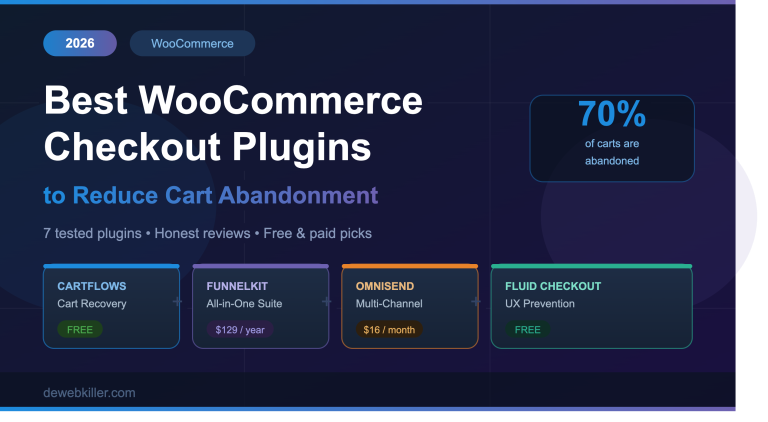
Are you losing sales before customers even complete their order? You are not alone. Cart abandonment is one of the biggest revenue killers for WooCommerce store owners in 2026. In fact, studies by the Baymard Institute show that nearly 70% of shoppers abandon their carts before checking out. That means for every 10 customers ready to buy, 7 walk away empty-handed.
The good news is that the right WooCommerce checkout plugin can dramatically reduce that number. Whether you need to recover abandoned carts with automated emails, streamline your checkout flow, or add one-click upsells, there is a plugin built for exactly that.
In this guide, we cover the 7 best WooCommerce checkout plugins for 2026. We compare features, pricing, and ideal use cases so you can make a confident decision without wasting hours on research.
Why Cart Abandonment Happens (And Why Your Checkout Is the Problem)
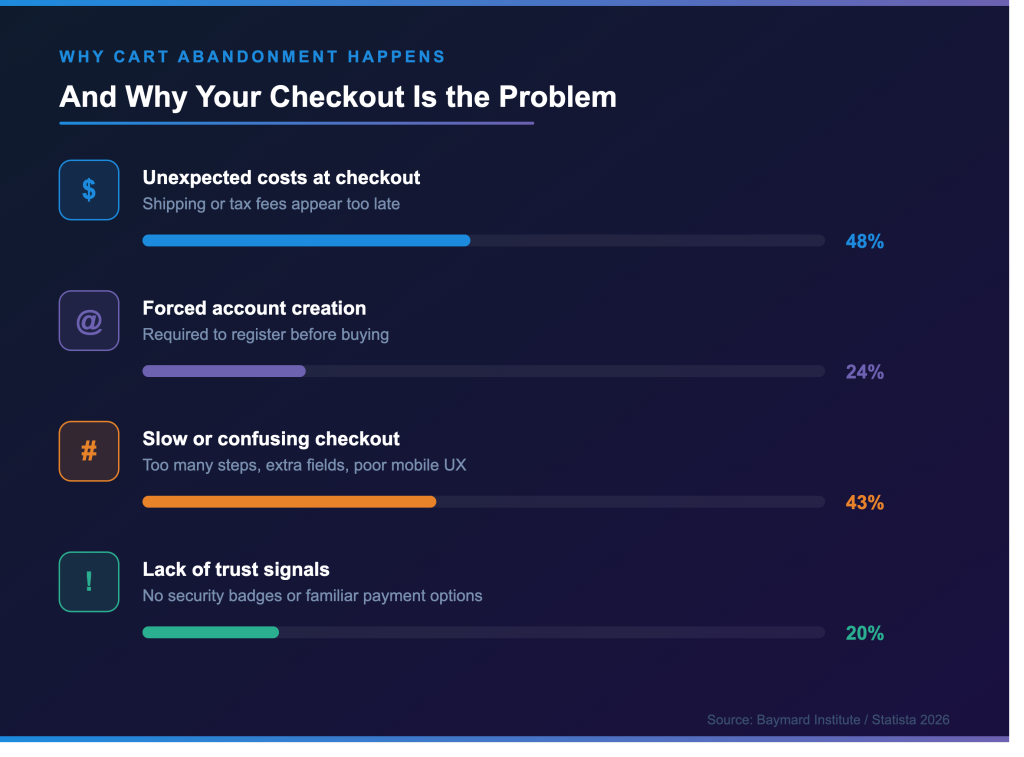
Before you pick a plugin, it helps to understand why customers leave. The most common reasons include:
- Unexpected costs: 48% of shoppers abandon because shipping or tax fees appear too late at checkout (Statista, 2026).
- Forced account creation: Around 24% of customers leave when they are required to register before buying.
- A slow or confusing checkout: Extra fields, too many steps, and poor mobile design all push customers away.
- Lack of trust signals: No visible security badges or unfamiliar payment options create hesitation.
- Just browsing: Around 43% of abandoners were never ready to buy in the first place.
The default WooCommerce checkout does not solve any of these problems. It forces customers through a cart page, a checkout page, and multiple form fields before they complete a purchase. That is why store owners increasingly turn to dedicated checkout plugins.
What to Look for in a WooCommerce Checkout Plugin
Not all checkout plugins work the same way. Before you install anything, consider these factors:
- Capture method: Does the plugin save the customer’s email before they leave, or only after they submit the form?
- Recovery channels: Does it send email only, or does it also support SMS and web push notifications?
- Checkout optimization: Does it streamline the form, add express payment buttons, or reduce the number of steps?
- Pricing: Free plugins work well for basic recovery. Premium plugins make sense once your store has consistent monthly revenue.
- Compatibility: Does it work with WooCommerce’s new Cart and Checkout blocks, not just shortcode-based checkout?
With those criteria in mind, here are the best options available right now.

The 7 Best WooCommerce Checkout Plugins for 2026
1. Cart Abandonment Recovery by CartFlows: Best Free Plugin for Cart Recovery
Best for: Stores starting from zero who need a reliable recovery sequence at no cost.
If you want to recover abandoned carts without spending a penny, Cart Abandonment Recovery by CartFlows is the most straightforward starting point. It holds over 300,000 active installs on WordPress.org and consistently earns strong reviews for its ease of setup.
The plugin captures the customer’s email address at the first step of checkout before they click “Place Order.” Once it detects an abandoned cart, it automatically fires a configurable 3-email recovery sequence. Each email includes a one-click link that restores the customer’s exact cart, making it frictionless to return and complete the purchase.
Key features:
- Automatic email capture at checkout (no form submission required)
- Pre-built email templates with customizable timing
- Auto-generated coupon codes inserted into recovery emails
- 1-click cart restore links
- GDPR-compliant opt-in checkbox for email collection
- Dashboard reporting to track recovery rates and revenue
What it does well: Setup genuinely takes under 15 minutes. You install, activate, set your email subject lines, configure timing, and you are live. For stores that simply need a working recovery sequence shipped this week, this plugin delivers.
Limitations: There is no SMS support, behavioral segmentation, or A/B testing. As your store grows, you will likely outgrow the free version and move to a platform like Omnisend or FunnelKit.
Pricing: Free
2. FunnelKit (formerly WooFunnels): Best All-in-One Checkout and Automation Suite
Best for: Stores that want checkout optimization, CRM, email automation, and abandoned cart recovery all in one platform.
FunnelKit is used by over 40,000 WooCommerce stores and is widely considered the most feature-complete funnel and checkout plugin available for WordPress. It goes far beyond simple cart recovery and it replaces your entire marketing stack.
FunnelKit includes a drag-and-drop checkout field editor, pre-built Shopify-style checkout templates, express payment buttons (Apple Pay and Google Pay), Google address autocomplete, order bumps, one-click upsells, A/B split testing, and a built-in CRM with email and SMS automation sequences.
Key features:
- One-page, multi-step, and Shopify-style checkout templates
- Express checkout with Apple Pay and Google Pay
- Drag-and-drop checkout field editor
- Order bumps and one-click post-purchase upsells
- A/B testing for checkout pages and full funnel steps
- Built-in CRM with email sequences and SMS automation
- Deep WooCommerce integration with behavioral segmentation
What it does well: FunnelKit is the right choice if you want a single platform handling funnels, email recovery, CRM, and checkout optimization without needing separate tools. It is particularly powerful for stores with large catalogs running personalized offers.
Limitations: The learning curve is steeper than CartFlows. Automations are only included from the Professional plan upward, so the entry price is higher. Additionally, some users report it takes longer to configure correctly.
Pricing: Free version available. Paid plans start at $129/year for one site. The Elite plan at $399/year covers 30 sites.
3. CartFlows Pro: Best for Agencies and Multi-Site Stores
Best for: Agencies managing multiple client stores who need a fast, modular checkout and funnel builder.
CartFlows Pro is built by Brainstorm Force, the same team behind the Astra theme. It focuses on checkout performance and funnel flows, and it remains one of the most popular conversion tools in the WooCommerce ecosystem.
Unlike FunnelKit’s all-in-one approach, CartFlows follows a modular philosophy. You pay only for what you need. The core plugin handles checkout optimization and funnel building. You then add optional tools like Modern Cart, Cart Abandonment Recovery Pro, and Power Coupons as your store grows.
Key features:
- High-converting checkout templates compatible with Elementor, Gutenberg, Divi, and Beaver Builder
- Order bumps and one-click upsells/downsells
- A/B split testing for funnel steps and checkout pages
- Address autocomplete for faster checkout
- Modern side cart (floating cart experience)
- Cart Abandonment Recovery Pro (available as part of the Suite)
- Agency-friendly licensing with 3 sites on the Pro plan
What it does well: CartFlows sets up faster than FunnelKit and costs less at every tier. For agencies managing a fleet of client sites, the modular add-on approach and generous site limits make it the more practical choice.
Limitations: Some recent reviews flag conflicts with WooCommerce’s new Cart and Checkout blocks. Stores using block-based checkout may need to fall back to the shortcode checkout.
Pricing: The CartFlows Suite starts at $199/year for one site. A lifetime deal is available at $999 for 30 sites.
4. CartBounty: Best for Early Email Capture
Best for: Stores where many visitors start filling out checkout but rarely complete the purchase.
CartBounty takes a different approach to cart recovery. Instead of waiting for customers to submit the checkout form, it captures the email address as soon as it is typed, even if the customer never presses “Place Order.” This early-capture method is its standout feature and gives it a significantly higher capture rate than plugins that wait for form submission.
Beyond capture, CartBounty saves cart data in real time as visitors fill in checkout fields. This means it can pre-fill the form for returning abandoners, reducing friction when they come back.
Key features:
- Early-field email capture (fires as the customer types, not on submit)
- Real-time cart monitoring with live dashboard
- Exit-intent popups to catch customers before they leave
- Detailed abandonment reports showing which products are abandoned most
- Abandonment data by country and device
- Pre-fills checkout form for returning visitors
- GDPR compliance
What it does well: CartBounty’s early-capture capability is genuinely best-in-class. If your analytics show high checkout start rates but low completion rates, this plugin captures those leads that other plugins miss entirely.
Limitations: The reporting and analytics are basic compared to FunnelKit. There is no SMS channel or advanced segmentation on the free version. The Pro price of $108/year is steep unless early capture is your specific priority.
Pricing: Free version available. Pro starts at $79-108/year for a single site.
5. Omnisend: Best for Multi-Channel Recovery (Email + SMS + Push)
Best for: Growing stores that want email, SMS, and web push notification recovery in one platform.
Omnisend is not a WordPress plugin in the traditional sense. It is a full email and SMS marketing platform with deep WooCommerce integration. However, it belongs on this list because it offers the most powerful multi-channel recovery system available for WooCommerce store owners.
Where CartFlows sends emails only, Omnisend sends recovery messages across email, SMS, and web push notifications simultaneously. Its browse-and-add-to-cart capture method identifies abandoners earlier in the funnel than email-at-checkout plugins, as long as the customer is an existing subscriber or returning contact.
Key features:
- Multi-channel recovery: email, SMS, and web push notifications
- Browse-and-add-to-cart capture (3-5x more abandoners identified vs. email-at-checkout)
- Pre-built abandoned cart automation workflows
- Dynamic product blocks in emails (shows the exact abandoned items)
- Advanced segmentation by geography, purchase history, and engagement
- A/B testing for subject lines, send times, and message content
- Detailed campaign analytics and revenue attribution
What it does well: Omnisend is the strongest upgrade from CartFlows free once your store reaches a level where multi-channel recovery justifies the cost. The combination of email, SMS, and push notifications significantly outperforms single-channel recovery.
Limitations: It is a SaaS platform rather than a self-hosted plugin, which means a monthly subscription rather than a one-time purchase. Pricing also scales with your contact list size.
Pricing: Free plan available (up to 250 contacts). Paid plans start at $16/month.
6. YITH WooCommerce Recover Abandoned Cart: Best for Guest Checkout Recovery
Best for: Stores with a high volume of guest shoppers who need YITH ecosystem integration.
YITH is one of WooCommerce’s largest plugin ecosystems with over 80 plugins. Their abandoned cart recovery plugin focuses specifically on capturing and recovering carts from guest users and unregistered visitors, a segment that many recovery plugins handle poorly.
The plugin sends customizable automated email sequences with coupon codes and tracks recovery performance through a clean dashboard. It also adds pending order recovery, which catches orders that failed at payment, not just abandoned carts.
Key features:
- Email recovery for both guest and registered users
- Customizable HTML email templates with coupon insertion
- Pending order recovery (catches failed payments, not just abandonment)
- Configurable send delays and multi-email sequences
- Integration with YITH Multi-Step Checkout
- YITH ecosystem integration (Points and Rewards, Wishlist, and more)
- Dashboard analytics and recovery reporting
What it does well: Pending order recovery is a genuine differentiator. It captures revenue lost to payment failures that other plugins simply ignore. For stores already using the YITH ecosystem, the native integrations add real value.
Limitations: For stores outside the YITH ecosystem, the price is harder to justify against more capable alternatives at similar cost.
Pricing: Premium from $89.99/year.
7. Fluid Checkout: Best Free Checkout UX Upgrade
Best for: Stores that want to prevent abandonment by rebuilding the default checkout page without a full funnel plugin.
Not every abandonment problem requires a recovery email sequence. Sometimes, the checkout page itself is the problem including too many fields, poor mobile layout, and a confusing multi-page process. Fluid Checkout solves exactly that.
Instead of adding recovery tools, Fluid Checkout rebuilds WooCommerce’s default checkout page into a streamlined, mobile-first experience. It reduces the number of visible fields, improves input types for mobile keyboards, and optimizes tap targets for small screens. The result is a cleaner, faster checkout that prevents abandonment before it happens.
Key features:
- One-step or multi-step checkout layout (your choice)
- Mobile-first form design with optimized input types and tap targets
- Inline form validation (errors shown immediately, not on submit)
- Address autocomplete
- Guest checkout emphasis to reduce account-creation friction
- Express payment button support
- Compatible with popular payment gateways and themes
- Genuinely production-grade free version
What it does well: The free version handles most use cases without forcing an upgrade. It is the most practical prevention-first option for stores that do not yet need a full funnel builder.
Limitations: It only rebuilds the default /checkout/ page and it cannot embed checkout on a product page or landing page. It is not a fit for funnel-driven stores.
Pricing: Free. Pro version available.
Quick Comparison Table
| Plugin | Best For | Free? | Paid From | Channels |
|---|---|---|---|---|
| Cart Abandonment Recovery | Zero-budget recovery | Yes | Free | |
| FunnelKit | All-in-one automation + CRM | Yes | $129/year | Email, SMS |
| CartFlows Pro | Agencies, multi-site | Ltd | $199/year | |
| CartBounty | Early email capture | Yes | $79/year | |
| Omnisend | Multi-channel recovery | Yes | $16/month | Email, SMS, Push |
| YITH Recover Abandoned | Guest user recovery | No | $89.99/year | |
| Fluid Checkout | Checkout UX / Prevention | Yes | Free | Prevention |
Which Plugin Should You Choose?
The right plugin depends on your store’s current size and your specific problem. Here is a simple decision framework:
- Just starting out and need something free? Install Cart Abandonment Recovery by CartFlows. It works in under 15 minutes and costs nothing.
- Need multi-channel recovery (email + SMS + push)? Upgrade to Omnisend once your volume justifies it.
- Running an agency with multiple client stores? CartFlows Pro offers the best agency licensing and modular pricing.
- Want one platform to replace email marketing tools too? FunnelKit handles funnels, CRM, and automations in one install.
- Getting lots of partial checkouts but low completion? CartBounty’s early-capture feature is the right fix.
- Your checkout page itself is the bottleneck? Fix it first with Fluid Checkout before adding any recovery tool.
5 Quick Wins to Reduce Cart Abandonment Today (No Plugin Required)
While you decide on a plugin, these changes take under 10 minutes and can reduce abandonment immediately:
1. Enable guest checkout: Go to WooCommerce > Settings > Accounts and Privacy and check “Allow customers to place orders without an account.”
2. Show shipping costs early: Display estimated shipping on the cart page, not just at checkout.
3. Add trust badges: Place SSL, payment security, and money-back guarantee icons near the “Place Order” button.
4. Reduce checkout fields: Remove the Company Name, Address Line 2, and Phone fields if you do not need them.
5. Offer more payment methods: Add Stripe, PayPal, and Apple Pay if you have not already. More options = fewer drop-offs.
Frequently Asked Questions
What is the best free WooCommerce checkout plugin for cart abandonment?
Cart Abandonment Recovery by CartFlows is the best free option. It has over 300,000 active installs, captures emails before checkout completes, and sets up in under 15 minutes. It is the ideal starting point for any WooCommerce store.
How do WooCommerce cart abandonment plugins capture emails?
Most plugins capture the email address when the customer enters it on the checkout page, even before they submit the form. Advanced tools like CartBounty go further and capture the email as the customer types it, giving a higher capture rate for guests who start checkout but never complete it.
Do WooCommerce checkout plugins slow down my site?
High-quality plugins like CartFlows, FunnelKit, and Fluid Checkout are optimized for speed. However, you should always test on a staging site first. Avoid loading multiple checkout plugins simultaneously, as they can conflict and add unnecessary scripts to your checkout page.
Can I use more than one WooCommerce checkout plugin at the same time?
It is possible, but conflicts are common. A safe combination is a checkout optimizer (like Fluid Checkout) paired with a recovery email plugin (like CartFlows). Avoid running two funnel builders side by side as they will almost certainly conflict.
What is the average cart abandonment rate for WooCommerce stores?
The Baymard Institute puts the global average at approximately 70% across all ecommerce in 2026. WooCommerce stores typically see similar rates, though mobile stores often have higher abandonment due to poor checkout UX on small screens.
Is FunnelKit better than CartFlows?
It depends on your needs. CartFlows is faster to set up, cheaper at every tier, and better for agencies. FunnelKit is more powerful if you need built-in email automation, CRM, and deep segmentation under one roof. Most stores start with CartFlows and move to FunnelKit as their marketing needs grow.
Conclusion
Cart abandonment is a problem every WooCommerce store faces, but it is not an unavoidable one. The right checkout plugin helps you recover lost revenue automatically, streamline the buying experience, and convert more of the traffic you already have.
Start with a free tool like Cart Abandonment Recovery by CartFlows if you are just getting started. As your store grows, upgrade to FunnelKit or Omnisend for more powerful automation and multi-channel recovery. And do not overlook prevention. Fixing your checkout with Fluid Checkout stops abandonment before it ever starts.
If you found this guide helpful, check out our WooCommerce performance optimisation guide to make sure your store loads fast enough to keep those customers around in the first place.